MINECRAFT: SHAPE YOUR BLOCKY WORLD
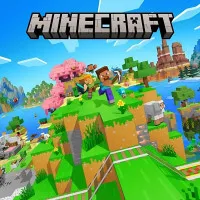
Minecraft is an addictive adventure game that unleashes your creativity. This playground gives you the freedom to shape your own universe. Players will explore the massive world built by numerous cune. You can decide to survive, create, explore, or combine all three. Whether you’re crafting tools, battling strange creatures in the dark, or building massive structures high above the clouds, the game lets you express your imagination with no boundaries. Ready to build your own world? Jump in and start your journey now!
Check Out Exciting Features that Shape the Game
- An open-world landscape with limitless exploration
- Massive maps with various wild terrains
- Dynamic day-night cycle with challenges
- Creative freedom with unlimited blocks
- Exciting action challenges filled with action.
CHOOSE YOUR PATH TO ADVENTURE
Minecraft revolves around two core ways to play: Survival and Creative. In the survival mode, you take charge of harvesting resources, crafting tools, and preparing for the creatures that crawl out when night falls. Managing hunger and health is essential, and every resource matters.
Meanwhile, the creative mode removes all limits. You engage in building challenges, using resources to create your own empire. From a floating castle to an entire city and more, these buildings shine out with your ultimate imagination.
Start Your Journey Step-by-Step
- Gather Basics: Collect wood, stone, and food for early survival.
- Craft Essentials: Make tools, weapons, and basic shelter items
- Build Shelter: Protect yourself from nighttime mobs around your base.
- Explore Biomes: Travel through deserts, forests, caves, and mountains.
- Upgrade Gear: Smelt ores and craft stronger tools and armor
- Fight Creatures: Defend yourself from zombies, spiders, and skeletons.
- Shape Worlds: Create structures, farms, and maps in any style you like.
Learn Simple Moves
- WASD: Move around the world
- Spacebar: Jump over blocks
- Left-Click: Break blocks or attack
- Right-Click: Place blocks or use items
- Scroll Wheel: Switch items in your hotbar
- E Key: Open your inventory
- Number Keys: Select hotbar slots
ENGAGE IN MORE CREATION GAMES
Want to express your imagination with exciting challenges? Check out Melon Sandbox, PolyTrack, and Ragdoll Playground!